
Customer support is the backbone of any successful business. Whether you are running an IT consulting firm, an e-commerce store, or a SaaS company, your ability to respond quickly and effectively to customer issues defines your reputation. This is where Zendesk comes in.
Zendesk is a cloud-based customer service and ticketing platform that centralizes all customer interactions. Instead of scattered emails, phone calls, and chat messages, Zendesk organizes everything into a structured ticketing system. This ensures no request is lost, every issue is tracked, and managers can measure performance.
Zendesk is one of the market leaders in help desk solutions for professionals and businesses. That’s why the XPCloud teams recommend this software and offer their integration and training services to help you get to grips with it and integrate it optimally into your IT ecosystem.
Example:
Imagine a company receiving 50 support emails daily. Without Zendesk, these emails sit in inboxes, get forwarded, and sometimes forgotten. With Zendesk, each email becomes a ticket with a unique ID, status, and assigned agent. The system tracks progress until resolution, ensuring accountability.
Official Zendesk Download & Access Links
https://www.zendesk.com/
Zendesk Customer Service Suite Overview: Zendesk Customer Serviceahi ha
Zendesk Help & Documentation: Zendesk Help Center
How to Get Started
-
- Visit the official Zendesk site → Click “Try for free.”
- Sign up with your work email → This ensures integration with your customer communication channels.
- Choose your plan → Zendesk Suite offers multiple tiers depending on your team size and needs.
- Download or access via browser → Zendesk is primarily cloud‑based, so you don’t need heavy installation. You log in via web or mobile apps.
- Invite your team → Add agents, assign roles, and start managing tickets.
How Zendesk Works
Zendesk’s workflow revolves around tickets. Every customer request, whether through email, chat, or phone, is converted into a ticket.
Ticket Lifecycle:
- Creation: A customer sends a query → Zendesk generates a ticket.
- Assignment: The ticket is assigned to an agent or team.
- Tracking: Status changes (Open → Pending → Solved).
- Resolution: Once fixed, the ticket is marked “Solved.”
- Feedback: Customers can rate their experience.
Example:
- A client emails: “My VPN is not connecting.”
- Zendesk creates Ticket #31699.
- Assigned to IT Support.
- Agent updates: “Issue identified, firewall misconfiguration.”
- Ticket marked “Solved.”
- Customer rates service as “Good.”
This structured approach eliminates chaos and ensures transparency.
Platforms Available
- Web App: Accessible via any browser.
- Mobile Apps: Available on iOS and Android (search “Zendesk” in App Store or Google Play).
- Integrations: Works with Microsoft Teams, Slack, Google Workspace, and more.
Pros & Cons of Zendesk
Pros
- Omnichannel Support: Email, chat, phone, social media — all in one place.
- Automation: Triggers and macros reduce repetitive tasks.
- Analytics: Detailed reports on resolution times, agent performance, and customer satisfaction.
- Scalability: Works for startups and enterprises alike.
- Integration: Connects with CRM, Slack, Microsoft Teams, and more.
Cons
- Pricing: Higher compared to alternatives like Freshdesk or Zoho Desk.
- Complexity: Advanced features require training.
- Customization: Sometimes needs developer support.
- Learning Curve: New users may take time to adapt.
Zendesk in Action: A Visual Walkthrough
Home Page
The Home Page is the central dashboard.

- Left sidebar: Navigation (Home, Tickets, Shared work, Completed work).
- Main panel: List of open tickets with requester names and issues.
- Right sidebar: Statistics (25 solved, 14 open).
This gives managers a quick snapshot of workload and performance.
Inbox
The Inbox organizes tickets into categories:
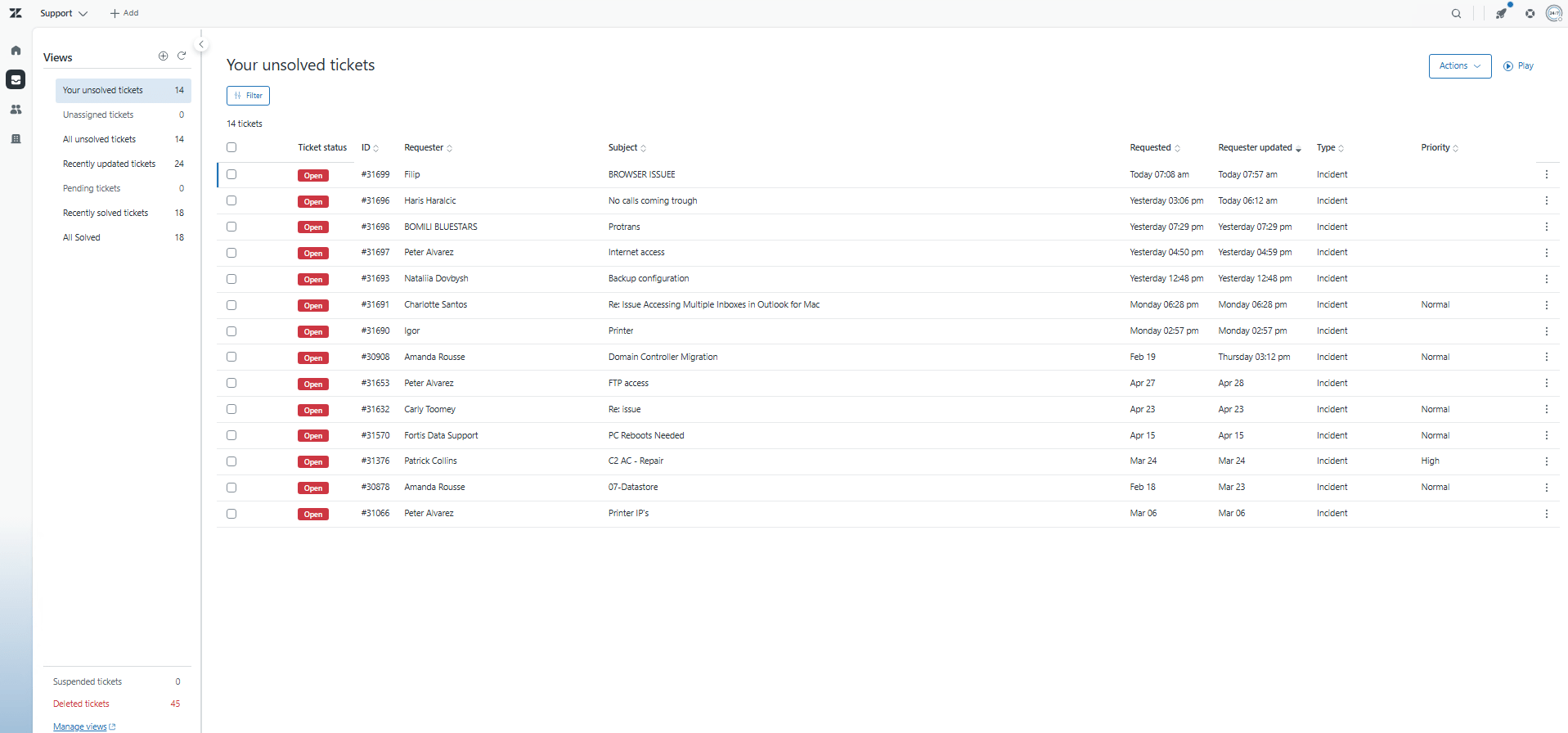
- Unassigned tickets: New tickets awaiting assignment.
- Recently updated: Tickets with recent activity.
- Pending: Waiting for customer response.
- Recently solved: Tickets closed recently.
Example: A ticket “Browser Issue” appears in Inbox → assigned to IT → moved to Pending after customer reply.
Unresolved Tickets
Shows all open tickets. Each entry includes:
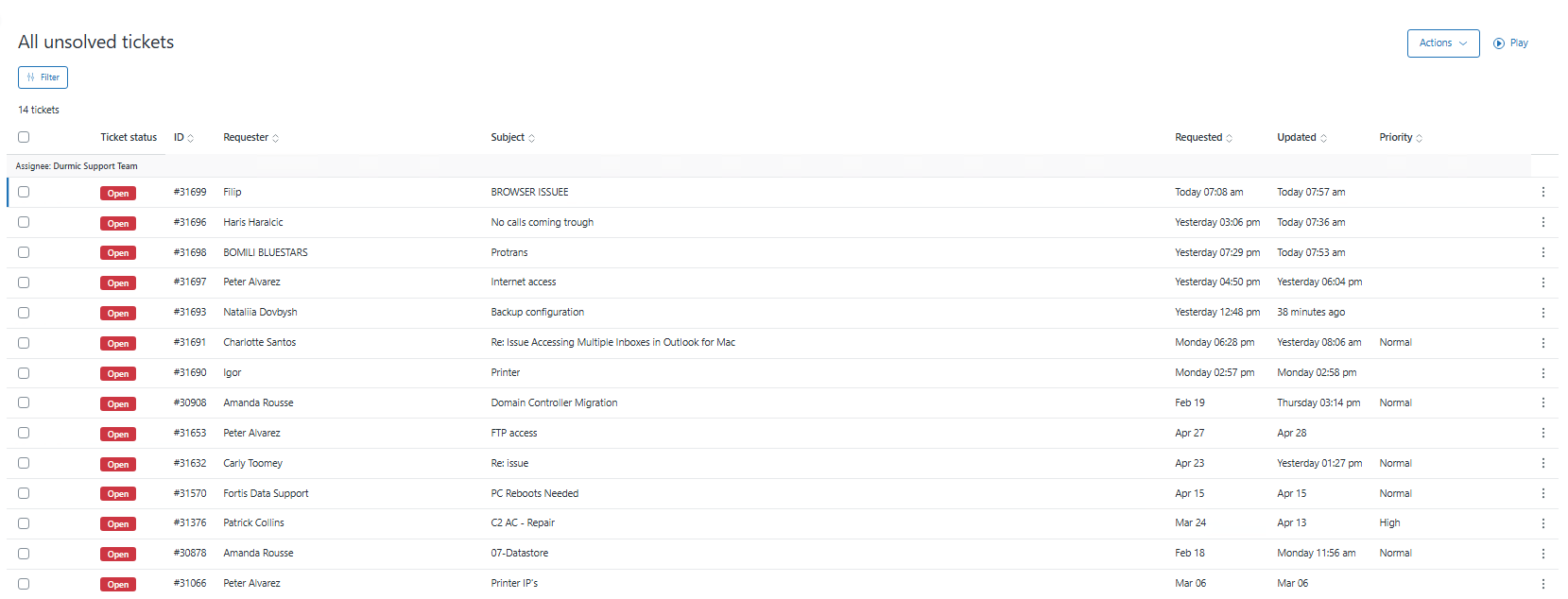
- Ticket ID (#31699, #31696, etc.)
- Requester name (Filip, Haris, BOMILI BLUESTARS)
- Subject (Browser Issue, No Calls Coming Through)
- Requested/Updated timestamps
- Priority (Normal/High)
This view helps managers track unresolved issues and allocate resources.
Recently Updated Tickets
Displays tickets with recent changes.
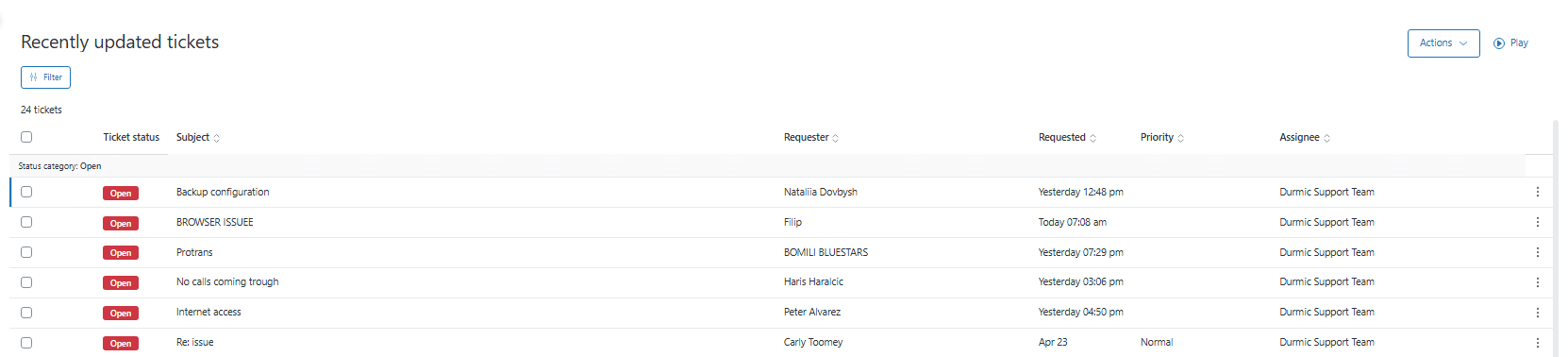
- Example: “Backup Configuration” updated yesterday.
- Useful for monitoring ongoing issues and ensuring updates are timely.
Pending Tickets
Shows tickets waiting for customer response.

- Example: If IT asks a client for VPN logs, the ticket moves to Pending until the client replies.
- If no pending tickets exist, the view shows “No tickets in this view.”
Recently Resolved Tickets
Lists tickets solved recently.

- Example: “Antivirus Update” requested yesterday → solved in 16 minutes.
- Shows efficiency and resolution speed.
All Resolved Tickets
Provides a complete history of solved tickets.

- Includes satisfaction ratings.
- Example: “Router Reboot Request” solved with “Good” rating.
- Useful for audits and performance reviews.
All Customers
Manages customer data.

- Features: Search, Add, Bulk Import.
- Example: BOMILI BLUESTARS → email: bomil@bluestarservices.us → timezone: GMT-05:00.
- Centralizes customer information for better support.
Organizations
Groups multiple customers under one company.

- Example: “Bluestar Services” organization → includes BOMILI BLUESTARS and Safety1.
- Add Organization: Click “Add organization,” enter details (name, domain, tags), save.
- Helps track tickets by company instead of individuals.
Suspended/Deleted Tickets
Suspended tickets are usually spam or invalid requests.

- Example: Duplicate emails or auto-generated spam.
- Admins can review and either delete or restore them.
Keeps the system clean and focused on genuine issues.
Comparison with Other Ticketing Portals
| Feature | Zendesk | Freshdesk | Zoho Desk | Service Now |
|---|---|---|---|---|
| Ease of Use | *** | *** | *** | ** |
| Omnichannel Support | Yes | Yes | Limited | Yes |
| Automation | Advanced | Moderate | Basic | Advanced |
| Reporting & Analytics | Detailed | Good | Basic | Enterprise |
| Pricing | High | Affordable | Affordable | Very High |
| Scalability | Excellent | Good | Good | Enterprise |
Suggestions
- Small Businesses: Freshdesk or Zoho Desk if budget is tight.
- Enterprises: Zendesk or ServiceNow for advanced automation.
- IT Teams: Zendesk’s ticketing + customer management is ideal.
- Best Practice: Use automation rules to reduce manual workload.
Conclusion
Zendesk is a leading ticketing and customer support platform that empowers businesses to manage customer queries efficiently. Its strength lies in automation, omnichannel support, and analytics, making it ideal for medium to large organizations. While pricing and complexity may challenge smaller teams, its scalability and reliability justify its popularity.
By understanding each function — from Home Page to Organizations — businesses can maximize Zendesk’s potential. Compared to competitors, Zendesk remains one of the most robust solutions for professional support environments.
How to Configure Site-to-Site VPN Between WatchGuard Firebox T80 and Azure VPN Gateway
One thought on “Zendesk Review 2026: Features, Pricing, Pros & Cons of the Ticketing System”